
If you’ve ever wished your ads could react to the weather in real time, imagine this:
- A rainy day hits, and your ad for waterproof jackets pops up.
- A heatwave rolls in, and suddenly your ice-cream promo is front and center.
- Strong winds arrive, and your kite-surfing gear gets its moment to shine.
That’s the power of weather-triggered Facebook ads—ads that automatically switch on or off depending on what’s happening outside. They’re not only more relevant but also more likely to get clicks, conversions, and attention when it matters most.
And here’s the best part: you don’t need a huge dev team or expensive software to pull this off. While waiting for us to build a simple Weather Trigger solution, you can use Make.com (formerly Integromat), to build your own automation that controls Facebook Ad Sets based on live weather conditions.
In this guide, I’ll show you exactly how to we up a weather-triggered Facebook ad campaign for a water sport retailer, using Make.
Why Weather-Triggered Facebook Ads Work So Well
Timing is everything in marketing. People are far more receptive to offers that match their current situation. When the environment around them changes, their needs and wants shift instantly.
- Cold weather → demand for warm clothes, hot drinks, heaters.
- Sunny days → sunglasses, outdoor events, travel deals.
- Storm warnings → insurance, repairs, delivery services.
By running ads that tie directly into the day’s forecast, you’re not just showing ads—you’re showing solutions to what people are literally experiencing in the moment. That’s why weather-based ad targeting can deliver stronger engagement and better ROI than static campaigns.
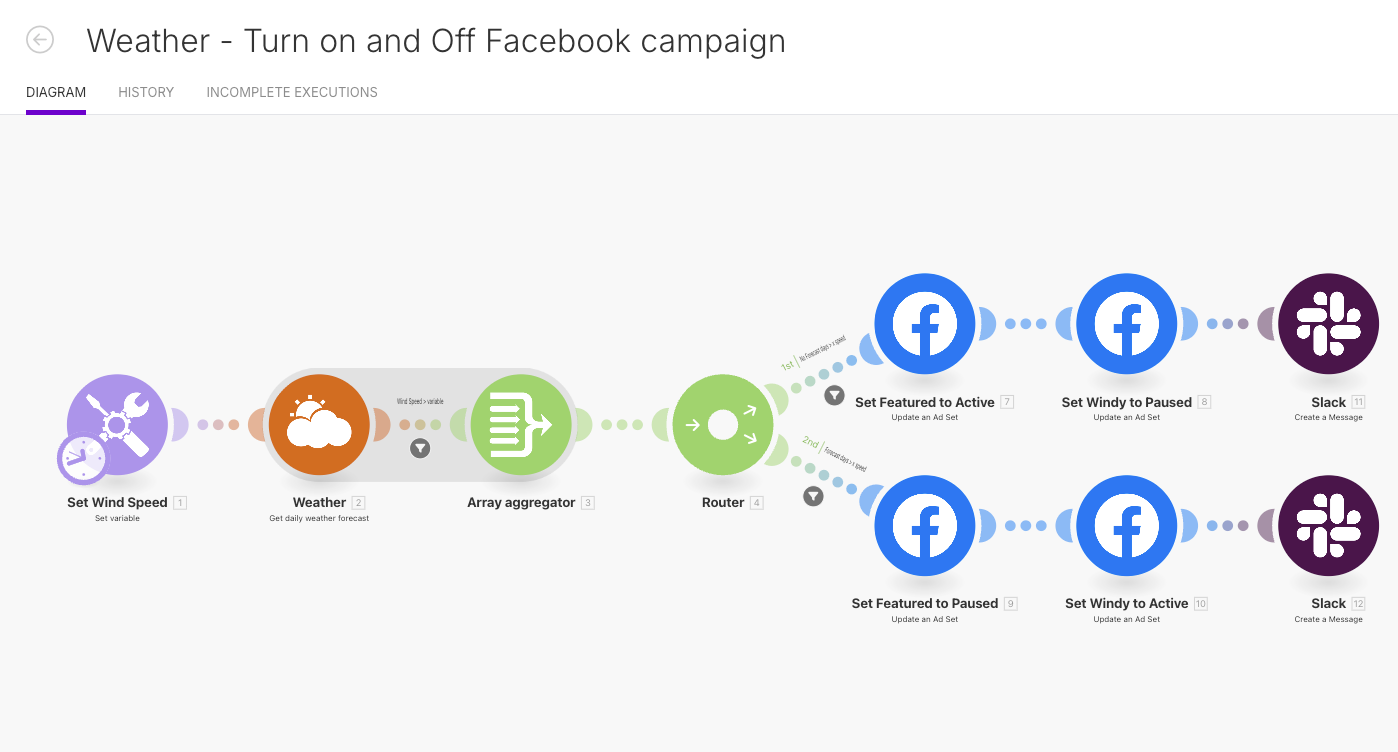
In the example you see in the image above, we’re turning on and off a Dynamic Meta Catalogue Ad Set based on wind speed. The client that we build this for sells wing foiling gear; when the wind blows, wing foilers get out on the water and enjoy the sport. They’re also then in a position to decide it’s time to buy new gear, so for this advertiser, it’s about being visible when people are looking for new gear – particulary on Facebook Marketplace.
The Automation You’ll Build
Before diving in, here’s a quick overview of the automation we’re setting up in Make:
- Check the weather forecast for your chosen location.
- Compare it to a threshold (e.g., wind speed, temperature, rainfall).
- Turn on the right ad set and pause the other.
- (Optional) Send a Slack notification so you know the switch happened.
This lets your Facebook campaigns run on autopilot, always in sync with the forecast.
Step 1: Prep Your Facebook Ad Sets
First things first—Facebook needs to have something to toggle between. Create at least two ad sets in Ads Manager:
- Windy Ad Set – ads and creatives that are tailored for windy days.
- Featured (or Evergreen) Ad Set – your general ads that run when conditions aren’t windy.
Pro tip: you can expand this idea beyond just windy vs. not windy. For example, you could set up different ad sets for hot days vs. cold days, rainy vs. sunny, or even temperature ranges.
Step 2: Build the Scenario in Make
Now for the fun part. Here’s how to put the pieces together inside Make:
1. Create a New Scenario
Log in to your Make account and click New Scenario.
2. Add the Weather Module
Search for “Weather” and choose Get daily forecast. Pick your location (e.g., your store’s city or the region your ads target).
3. Set Your Weather Variable
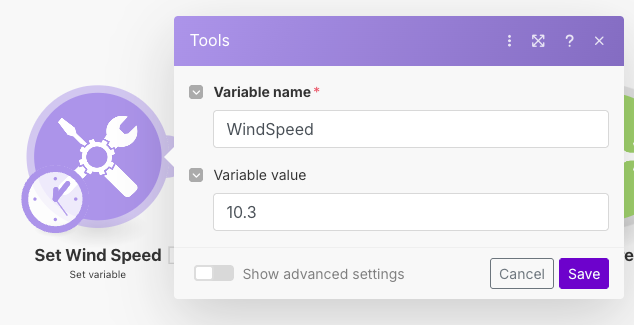
Add a Set Variable module. This defines your trigger point. For example:
windSpeedThreshold = 10.3mps
This means any wind speed greater than or equal to 10.3 meters per second will activate your “Windy” ad set.
4. Add a Router
Drop in a Router module. This will let you create two separate paths: one for windy conditions and one for non-windy conditions.
5. Configure Filters
- Path 1 (Not Windy): wind speed < threshold
- Path 2 (Windy): wind speed ≥ threshold
6. Update Facebook Ad Sets
Add two Facebook Ads modules to each path:
- Not Windy Path:
- Set “Featured” ad set → Active
- Set “Windy” ad set → Paused
- Windy Path:
- Set “Windy” ad set → Active
- Set “Featured” ad set → Paused
7. (Optional) Add Slack Notifications
Want to stay in the loop? Add a Slack module at the end of each path to ping you whenever the switch happens.
Example: Windy vs. Not Windy Ads
Here’s a simple example of how this might play out:
- On calm days, your default “Featured” ad set runs—maybe promoting general brand awareness or evergreen offers.
- When the wind picks up past your threshold, your automation pauses the “Featured” set and kicks in the “Windy” ads. Perfect if you sell outdoor gear, wind-proof products, or even services like delivery where weather impacts demand.
Things to Watch Out For
Before you go live, keep these points in mind:
- Logic Checks: Make sure your “if windy” and “if not windy” conditions are set correctly. A small mistake could leave the wrong ads running.
- Location Targeting: The weather location you’re tracking should align with your Facebook Ads geo-targeting. No point triggering a Melbourne ad based on Sydney’s forecast.
- Facebook’s Learning Phase: Turning ad sets on/off too often can reset Facebook’s learning phase. For best results, use this method for short-term, weather-sensitive promotions rather than evergreen campaigns.
Why Use Make for Weather-Triggered Ads?
There are dedicated tools out there that offer weather-based ad triggers—but many are expensive and geared toward enterprise. Make is affordable, flexible, and integrates directly with both Facebook Ads and Slack, giving small businesses and e-commerce brands the power to run dynamic, weather-based campaigns without the hefty price tag.
Final Thoughts
Weather-triggered Facebook ads are one of those tactics that make you wonder: Why isn’t everyone doing this? They’re relevant, timely, and engaging in a way static ads just can’t match.
With a simple automation in Make, you can:
- Sync your ads to real-time weather.
- Save yourself the manual toggling.
- Deliver campaigns that feel instantly relevant to your audience.
Whether it’s sunny, rainy, windy, or downright unpredictable, your ads can now stay one step ahead of the forecast—and keep your customers paying attention.