Weather Targeting for Facebook and Meta Ads: How It Works in 2026

Weather changes what people buy, and the people scrolling Facebook and Instagram feel it too. A study co-authored by Facebook’s own data scientists found that rain measurably shifts the mood of what people post. But Meta gives advertisers no way to target by weather.
This guide explains how weather-triggered Meta ads actually work in 2026, the platform rules that decide whether they help or hurt, and how to set up your first one.
Meta has no weather targeting
There’s no weather option in Meta’s targeting, and there never has been. Meta’s automated rules can’t use weather either: their conditions are delivery and performance metrics such as spend, cost per result, ROAS and frequency, plus time.
Google Ads doesn’t have native weather targeting either. On both platforms, weather-triggered ads need three things:
- A weather source that reports current conditions and forecasts for each location you advertise in.
- Rules that say what should happen when conditions are met, for example “rain forecast in Brisbane today”.
- An action through the Marketing API: switching ad sets on or off, changing budgets, or changing which ads run.
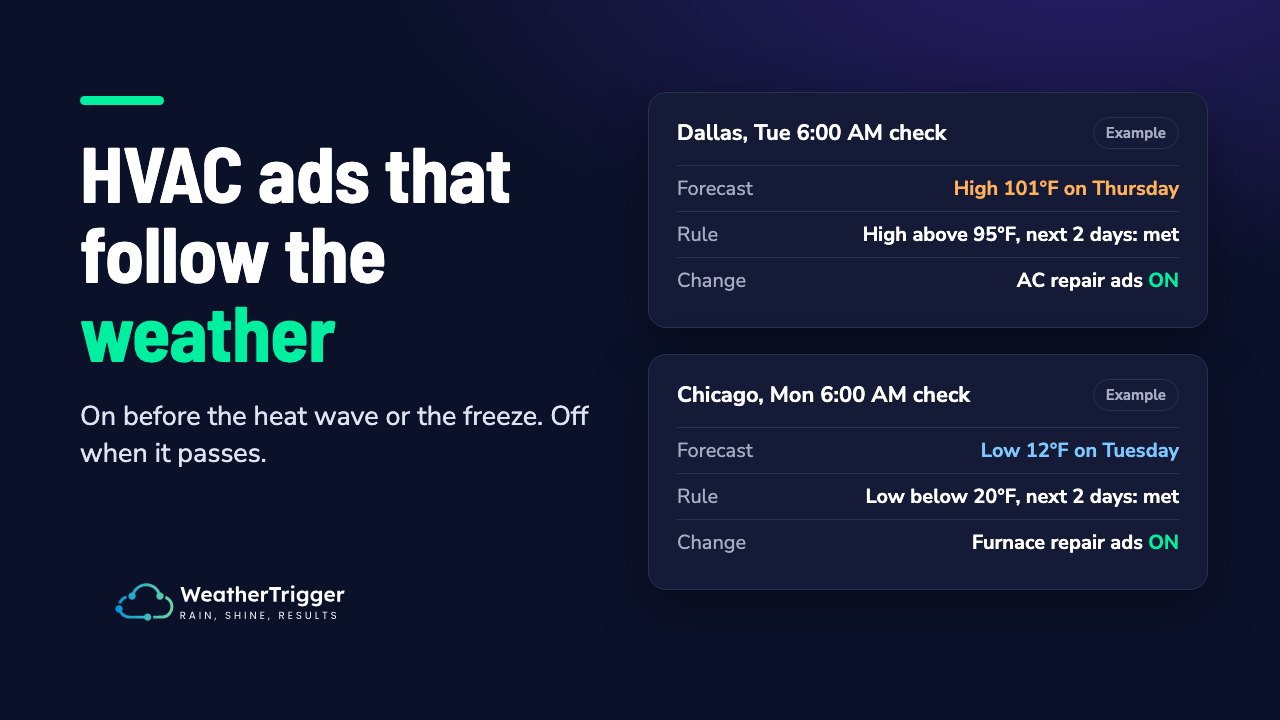
You can build this yourself, set it up in a tool like Make, or use a dedicated product like WeatherTrigger.
Three ways to act on the weather
1. Switch ad sets on and off
The simplest approach is to pause an ad set when the weather isn’t right for it and resume it when it is. For example, a roofer’s storm-damage ads run only in the days after heavy rain, and a café’s iced-drinks ads run only on hot days.
Best for: weather-dependent offers, local service businesses, and awareness campaigns. It’s also what WeatherTrigger does.
Watch for: the learning phase and campaign budgets (see below).
2. Change budgets
Instead of switching ads off, you raise the budget when the weather favours your product and lower it when it doesn’t. The ad set keeps running, so it keeps its learning.
Best for: conversion campaigns that need steady delivery.
Watch for: the Marketing API allows each ad set’s budget to change only 4 times an hour. Large budget changes can also count as significant edits and restart learning. Ads Manager shows how far you can raise a budget without that happening. Meta’s budget scheduling (added in 2025) raises budgets without resetting learning, but only for time windows you set in advance, so it can’t react to the weather on its own.
3. Match the creative to the weather
Run separate ads or ad sets with creative for each condition (a sunny version, a rainy version) and switch between them by weather. Research on weather and valuation found that people value products more when they can picture using them in the current conditions, so the creative matters as much as the timing.
Best for: brands with products for several kinds of weather.
Watch for: adding or swapping ads is documented as a significant edit, although in 2025 practitioners observed it often doesn’t restart learning.
The platform rules that matter
The learning phase
Meta’s guidance is that an ad set needs about 50 optimisation events within 7 days of its last significant edit to exit the learning phase. Some advertisers report lower thresholds in 2025–26, but Meta hasn’t confirmed them.
For weather rules, the key point is this: resuming an ad set that has been paused for 7 days or more restarts learning. Shorter pauses usually don’t, although delivery can be unsteady for a day or so after resuming.
That means:
- Rules that switch an ad set on and off every few days work well with Meta.
- A rule that could keep an ad set off for a week or more (a long dry spell, a mild winter) will reset learning when it comes back on.
- Checking many times a day and flipping on every small change is worse than checking less often and only switching when conditions have clearly changed.
Campaign budgets
If an ad set sits inside an Advantage+ campaign budget (formerly Campaign Budget Optimisation), pausing it doesn’t save money. Meta moves the spend to the other ad sets in the campaign. When the paused ad set comes back, it often gets little of the budget.
For weather-switched ad sets, use ad set budgets, or put them in their own campaign.
Fragmentation
Meta rewards simple account structures. Its Opportunity Score recommends combining small ad sets and using Advantage+ audience and placements. Splitting one campaign into many small weather ad sets works against that. Keep the number of weather-switched ad sets small, and give each one enough budget to reach its optimisation events.
Setting up your first weather rule
Here’s a worked example. It’s illustrative, not a customer result.
The business: a Brisbane roofing company that gets more enquiries after storms.
- Pick the weather that moves demand. Storm damage follows heavy rain and strong wind gusts. Severe weather warnings are a useful signal too.
- Set up the ad set. Create an ad set for storm repairs, targeted at the area you service, with its own ad set budget. Use creative that fits the moment (“Storm damage? We can be there today”).
- Write the rule. For example: “Run the storm-repair ad set when rain of 20 mm or more, or wind gusts over 60 km/h, are forecast for Brisbane in the next two days.”
- Decide how it switches back. Keep the ad set running for a few days after the storm, then pause it once conditions have cleared. That covers the enquiries that come in after the rain stops.
- Check how long it could stay off. In a dry month, the ad set could be paused for more than a week. If that’s likely, keep a small always-on ad set running, or accept that learning will restart.
Other rules that fit the same pattern:
| Business | Condition | Action |
|---|---|---|
| Café or juice bar | Maximum of 30°C or more today | Run iced-drinks ads |
| Heating and cooling | Maximum of 35°C or more in the next 3 days | Run air-conditioning ads |
| Online clothing store | Rain forecast on a weekend | Run rainwear ads |
| Pool supplies | Warm, dry forecast for the week | Run pool-chemical ads |
| Pest control | High humidity for several days | Run pest ads |
Doing it yourself with the Marketing API
If you want to build it yourself, you need three things:
- A token with the
ads_managementpermission. Use a user token from Facebook Login, or a system-user token from Business Manager. An app access token won’t work for ad changes. - A weather API such as OpenWeather.
- Something to run the check on a schedule, such as a cron job, a cloud function or a Make scenario.
Pausing an ad set is a single call. The current Marketing API version is v26.0, and older versions expire, so check Meta’s changelog before you build.
curl -X POST "https://graph.facebook.com/v26.0/{AD_SET_ID}" \
  -d "status=PAUSED" \
  -d "access_token={TOKEN}"
Use status=ACTIVE to resume. To change a budget, send daily_budget in the account currency’s smallest unit (cents), so daily_budget=5000 is $50.00.
The code is the easy part. Most of the work is in the details around it: forecasts for several locations, deciding when to switch back, not flipping on every small change, handling expired tokens and API errors, and keeping a record of why each change happened.
Tools that do this for you
- WeatherTrigger switches Meta ad sets on and off, or cuts their budgets, by weather. You pick a location, conditions (temperature, rain chance, rain or snow amount, wind, gusts, humidity, cloud or severe weather alerts) and a time window (today, the next few days or the past 24 hours). The weather triggers page lists them all with example rules. It can also cut an ad set’s daily budget by a set percentage instead of pausing it, then restore it. It never raises a budget above what you set in Meta. It checks on your chosen schedule, from every 30 minutes to once a day. It only changes an ad set when conditions actually change, and it can switch back automatically once conditions have cleared on two checks in a row. Every check is logged. It doesn’t change bids, audiences or creative. Plans are $19, $49 and $99 a month, with a 30-day free trial.
- Make.com has native Facebook Ads modules and can call a weather API. It’s flexible if you’re comfortable building the logic yourself.
- WeatherAds, WeatherAlpha, Smartly and others cover Meta with different feature sets and pricing. See our comparison of weather-triggered ad tools.
Does it work?
The clearest Meta example is Molson Coors in Canada. Its Facebook mobile ads ran when the temperature passed 23°C and it was sunny, and the weather-specific ads had a 67% lower cost per click than generic creative. That was in 2013 and agency-reported, and Meta’s delivery system has changed a lot since then.
The wider research is solid. Rain lifts online spending, heat moves spending to the evening, and mobile promotions got a faster, stronger response in sunny weather. We’ve collected the evidence in what the research says about weather and consumer behaviour.
Measuring the result
Don’t rely on before-and-after comparisons. The weather changes too many things at once. Instead:
- Keep a holdout. Run the rule in some locations and not in similar ones, then compare.
- Use Meta’s Conversion Lift if your account has access, to measure incremental conversions.
- Tag the URLs of weather-triggered ads (for example
utm_campaign=storm_repairs_weather) so you can see their results in your analytics. - Keep a log of every switch and the weather reading that caused it, so you can line results up against conditions.
More on this in our guide to weather ad measurement.
Next steps
Start with one ad set and one condition that clearly moves your sales. Run it for a month, compare it with a location where the rule isn’t running, and expand from there.
If you’d rather not build it yourself, try WeatherTrigger free for 30 days. No card needed.