HVAC Marketing Ideas That Follow the Weather
The best HVAC marketing ideas have one thing in common: they put your name in front of homeowners in the days their AC quits or their furnace won’t light. Those days follow the weather, not the calendar.
The numbers are big. ServiceTitan analysed about 800 HVAC shops and found that a heat wave lifts daily calls by 20% and daily revenue by 55%. A cold spell lifts same-day calls by about 20% and daily revenue by 70%. Most marketing plans are built around months and seasons. These ten ideas are built around those days instead, from Facebook ads that switch on before a heat wave to the after-hours phone cover that decides whether the extra calls become jobs.
Why HVAC demand follows the weather
Two ServiceTitan studies put numbers on what every HVAC owner already feels.
Heat waves. Across about 800 HVAC shops from 2019 to 2021, heat waves raised daily calls by 20%, jobs by 25% and revenue by 55%. ServiceTitan counted a heat wave as two or more days that were unusually hot for the area, with no relief at night. The first heat wave of the season was worth the most, at about 90% more revenue a day, and the effect faded with each one after it, down to about 20% by the fifth. The Northwest saw the biggest jump (120%), and the Southeast the smallest (30%), because a hot week there is just a normal week (ServiceTitan).
Cold spells. From November 2018 to February 2021, a cold spell raised same-day calls by about 20% and daily revenue by 70%, with 30% more jobs and a 30% higher average ticket. Shops in the Upper Midwest saw 185% more revenue a day and the Ohio Valley 160%, while California and Florida barely noticed. A typical season had about three cold spells (ServiceTitan).
Two things follow from that. Your biggest weeks are a handful of hot and cold spells that arrive at different times in every town. And the first one of each season is worth more than the rest. Every idea below is a way to be ready for those weeks, or to spend less in the weeks between them.
10 HVAC marketing ideas that follow the weather
1. Treat the first heat wave and the first cold spell as your two biggest weeks
The first hot spell finds every AC that failed over the winter, and the first cold spell finds every igniter that seized over the summer. That’s why ServiceTitan saw the first heat wave of the year bring in about 90% more revenue a day.
Get ready before the forecast turns: ads written and approved, a tune-up email drafted, extra parts on the trucks, and someone lined up to answer the phone. Watch the 7-day forecast from late spring and early fall, and move as soon as it shows the first run of hot or cold days.
2. Run Facebook ads that switch on before the weather turns
Facebook and Instagram ads are the easiest place to start, because people aren’t searching when they see them. An ad about Thursday’s heat, shown on Tuesday and Wednesday, reaches homeowners before they’re on hold with whoever ranks first on Google.
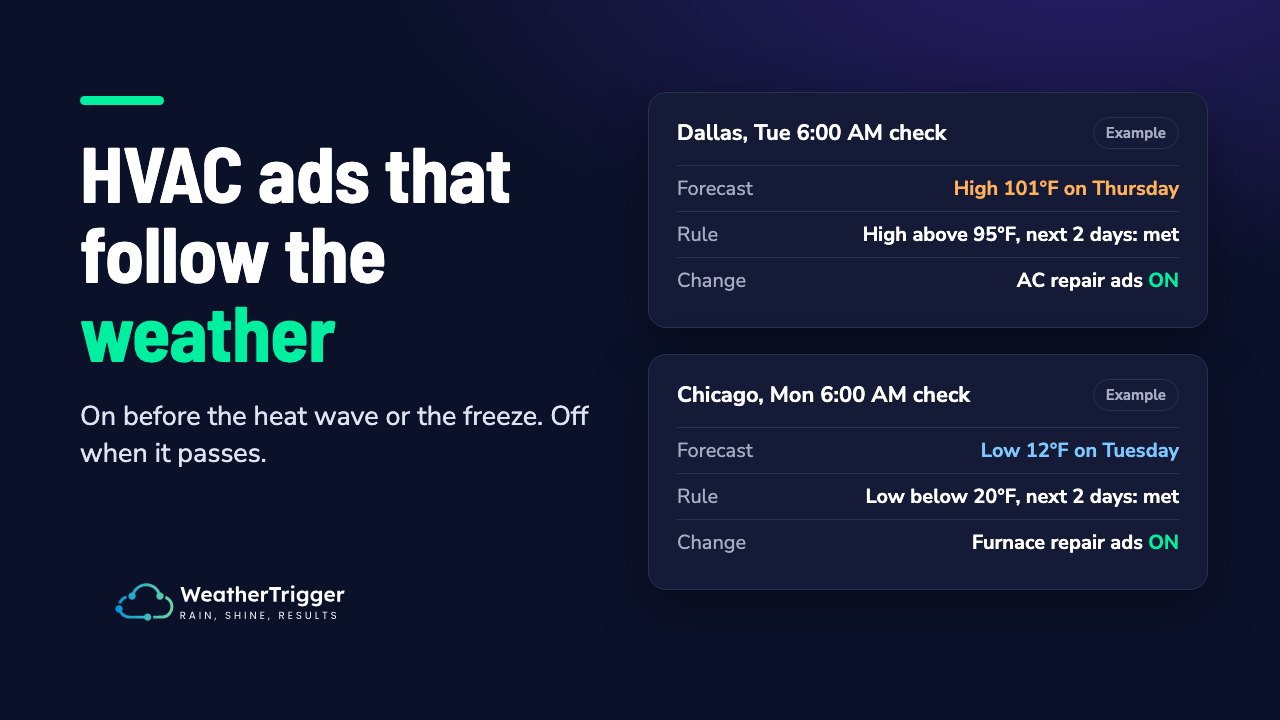
Meta has no weather targeting, so the switching has to come from outside Ads Manager. A tool or script checks the forecast for each service area and turns ad sets on when the rule is met. For example: turn on the “AC repair” ad sets when the forecast high is above 95°F in the next two days, then off again when it passes. The Facebook ads section below has example rules, and how weather targeting works on Meta covers the setup in more detail.
3. Stop paying for emergency ads in mild weeks
“Same-day AC repair” ads running through a mild week buy clicks with no urgency behind them. Let those ad sets run only when the weather calls for them, and spend the rest of the time on ads that fit a mild week: tune-ups, maintenance plans, new-system financing.
One catch: an ad set paused for seven days or more goes back through Meta’s learning phase when it resumes. Keep at least one always-on ad set in the account so it keeps learning, and expect the weather ad sets to be a little unsteady on the first day back.
4. Write ads about the weather people are living through
“Is your AC ready for Thursday’s 101°F?” beats “Fast, friendly AC service” every time the heat is real. Name the town and the temperature or the storm, and keep a short set of ads for each condition: a heat wave, a hard freeze, a humid week. In the best-known test of weather-specific creative, Molson Coors’ weather-matched Facebook ads in Canada had a 67% lower cost per click than its generic ads (2013, agency-reported; more examples in our guide).
A weather ad that keeps running after the weather has passed reads as stale, so it needs to switch off as reliably as it switches on.
5. Give every service area its own forecast
One national or metro-wide campaign treats Plano and Fort Worth as the same weather. They aren’t, and a storm or a cold front often hits one side of a metro hours before the other. Split your ad sets by town or by cluster of towns, so each one runs on its own forecast. ServiceTitan’s regional numbers show how much the effect varies. A cold spell more than doubled daily revenue in the Upper Midwest and did almost nothing in Florida.
6. Sell maintenance plans in the shoulder months
Spring and fall are when technicians have room in the schedule and homeowners aren’t stressed. That’s the time to sell tune-ups and maintenance agreements, so the next heat wave fills your schedule with members instead of strangers. ServiceTitan’s call data has October as the month with the smallest share of after-hours calls, a sign of how much less urgent the work is.
Promote the plan hardest in the mild weeks, and cut back those ads when a heat wave is forecast and the schedule is about to fill on its own.
7. Email and text your customers before the forecast hits
Your customer list is the cheapest audience you have. When the forecast shows a heat wave or a hard freeze two or three days out, send a short message: “Highs near 100°F from Thursday. Book a tune-up this week and skip the wait.” People who had their system serviced last year are the easiest jobs to win back, and they’d rather call you than search.
Keep the message tied to the forecast. A generic monthly newsletter can’t do what one well-timed text the day before a freeze can.
8. Answer the phone when it’s hot (and after hours)
Every idea above is wasted if the call goes to voicemail. ServiceTitan’s 2025 data shows 14.1% of calls to residential HVAC shops came in outside business hours in June, against 9.8% in October. Weekend calls peaked in August at 4.9% of all calls, against 2.95% in October (ServiceTitan).
Line up an answering service, an on-call rota or online booking before the first heat wave, not during it. Then check your ads run when someone can take the call.
9. Keep your Google Business Profile ready for the rush
When it’s 100°F, many homeowners search “AC repair near me” and call whichever profile looks open and trustworthy. Make sure your hours are right, emergency service is listed if you offer it, and recent photos show real vans and real installs. Post a short update when extreme weather is forecast. The busy weeks are also your best chance for reviews, so ask every customer whose house you cooled down on the hottest day of the year.
10. Move Google Ads budget into the extreme days too
Google Ads has no weather targeting either. Searches for repair rise on their own in a heat wave, so the risk is a daily budget that runs out by lunchtime on your best day. Check your caps before the first hot week. To go further, a Google Ads script can read a weather feed and raise bids or budgets by location (more on weather targeting in Google Ads).
Then measure it: compare cost per booked job on extreme days with mild ones, not just month against month. Measuring weather-triggered ads explains how to set up that comparison.
HVAC Facebook ads: rules that follow the forecast
Three rules cover most HVAC companies. Each one runs per service area, and the numbers are starting points to set against your local normal.
| Goal | Rule | Ad sets it changes |
|---|---|---|
| Catch the AC rush | Turn on when the high is above 95°F in the next 2 days, back off when it passes | AC repair, emergency cooling |
| Catch the heating rush | Turn on when the low is below 20°F in the next 2 days, back off when it passes | Furnace and heat pump repair |
| Don’t sell tune-ups to a full schedule | Cut the budget 50% when the high is above 95°F in the next 2 days, restore it when it passes | Tune-ups, maintenance plans |
A few things make these work:
- Set the number against local normal. ServiceTitan defined a heat wave as unusually hot for the area. In Dallas, 95°F is an ordinary July day. In Seattle, 85°F is a hot one. Pick the temperature that actually brings calls in each town.
- Use the forecast, not today’s reading. A rule on the next two days gets your ads out while people still have time to book. A rule on today’s temperature reacts after the calls have started.
- Use ad set budgets. If a switched ad set sits inside a campaign budget (Advantage+ campaign budget), pausing it moves its spend to the other ad sets instead of saving it.
- Air temperature, not “feels like”. Most weather tools, WeatherTrigger included, compare the forecast high or low air temperature. Wind chill and heat index aren’t part of the rule, so set the threshold with that in mind.
How WeatherTrigger fits in
WeatherTrigger runs these rules on the Facebook and Instagram ads you already have. You pick the ad sets and the towns, it checks each town’s forecast on your schedule, and it switches the ad sets on, off, or cuts their budget when the rule is met. It never raises a budget, and every check is logged with the forecast and the reason, so you can see why an ad set is on. The HVAC and heating presets start you at 90°F and 41°F, and you set the number for your area.
It starts with a 30-day free trial, no credit card needed.